Melliya: A Designer’s Take on Real-World Use
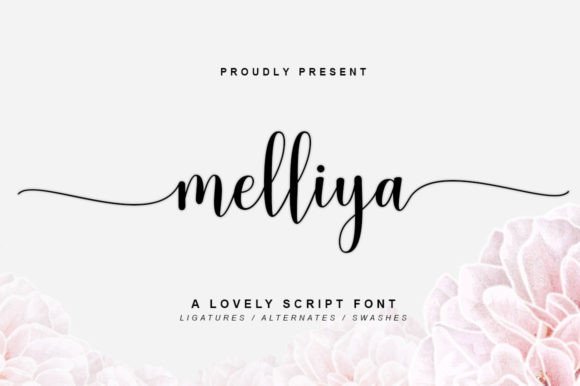
Opening a new font file always feels like unboxing a fresh tool—especially when it’s a script font like Melliya. Right off the bat, Melliya feels expressive without being overly dramatic. It has that modern script personality: fluid, slightly bouncy strokes with a touch of elegance that leans more contemporary than traditional. It’s not a calligraphy font trying to mimic quill work, nor is it a casual handwritten style. Melliya sits comfortably in between—refined but not stiff, stylized but still human.
First Impressions: Mood, Personality, and Purpose
The first time I typed out a few sample lines, I noticed how Melliya carries a confident yet approachable tone. The lowercase letters have enough flourish to feel decorative, but not so much that they become distracting. Uppercase letters are bold and impactful, making them suitable for brand marks or short headlines. The visual personality feels right for lifestyle brands, boutique packaging, or editorial features that want to feel elevated without being stuffy.
It’s the kind of font that works well in a modern luxury space—think artisanal food packaging, premium stationery, or curated lifestyle content. It doesn’t scream for attention, but it definitely holds it. Melliya feels like a display font that wants to be seen in the right context, not forced into every line of body copy.
Real-World Performance: Where Melliya Shines
I tested Melliya across several design applications, and it performed best in scenarios where visual impact matters more than long-form readability. Here’s how it stacked up in actual use cases:
- Logo design: Melliya works beautifully for brand marks that need a touch of sophistication. It pairs well with clean sans serif fonts for sublines, creating a balanced and modern brand identity.
- Packaging design: On product labels and packaging mockups, Melliya reads as premium and tasteful. It adds a human touch without looking too casual.
- Print and digital marketing: For posters, flyers, and social media graphics, Melliya elevates the tone. It reads well in both static and animated formats, especially when used for quotes or highlight text.
- Editorial and web headers: Used sparingly, Melliya adds visual interest to blog headers or website hero sections. Just be mindful of size and contrast to maintain readability.
- Creative digital assets: In Canva templates, Cricut projects, and printable design kits, Melliya adds a polished flair. It works well in commercial design assets where a modern script aesthetic is needed.
Where to Use Melliya with Care
Despite its versatility, Melliya isn’t a one-size-fits-all solution. It performs best in short bursts—think headlines, quotes, brand names, and accent text. Here are a few situations where I’d recommend using it cautiously:
- Large headlines in low-contrast settings: Depending on the background, Melliya’s flourishes can get lost if not given enough visual space.
- Extended body copy: It’s not designed for long paragraphs. Stick to display use only.
- Small-size applications: Even in digital use, Melliya loses clarity under 14px. Always test in black and white and at actual print sizes.
- Complex font pairings: While it pairs well with sans serif and serif fonts, combining it with another script or decorative typeface can create visual noise.
Impact on Branding and Design Flow
When evaluating a font for brand identity, I look beyond aesthetics—I consider how it affects recognition, consistency, and audience trust. Melliya brings a level of sophistication that feels intentional, not trendy. It’s modern enough to feel current but classic enough to avoid quick obsolescence.
In brand systems, Melliya works best as a supporting typeface or primary logo font. It helps establish visual hierarchy when used for headlines or callouts, especially when paired with a neutral sans serif or serif font. It also enhances engagement in social media visuals and digital ads by drawing the eye without overwhelming the message.
That said, consistency is key. Because Melliya is a script font, spacing and kerning can vary depending on the software or platform. Always test it in real mockups—especially if it’s going into packaging or print materials. Check how it behaves in uppercase versus lowercase, and make sure it maintains brand integrity across both digital and physical applications.
Design Notes: What to Test Before Final Use
Before locking in Melliya for client work or commercial use, here are a few practical checks I always run:
- Test in black and white: Some script fonts lose character without color, so make sure Melliya still reads clearly in monochrome.
- Check small sizes: Especially for digital use, confirm it doesn’t become illegible below 16px.
- Try it on real mockups: See how it looks in context—on product packaging, apparel, or digital banners.
- Compare with other font styles: Pair it with serif, sans serif, script, and display fonts to see how it fits into a broader typographic system.
- Review spacing and kerning: Some script fonts have inconsistent spacing, which can affect alignment in logo design or editorial layouts.
- Confirm commercial licensing: If you're using Melliya for client work or selling design assets, always verify that the font license allows for commercial use.
Final Thoughts: A Script Font That Earns Its Place
Melliya isn’t just another script font—it's a modern typography solution that brings both personality and professionalism to the table. It’s expressive enough for creative branding yet restrained enough for polished design systems. Whether you're building a brand identity, designing packaging, or crafting digital visuals, Melliya offers a refined alternative to more generic script fonts.
Like any creative font, it needs to be used with intention. But when placed thoughtfully, Melliya adds a touch of elegance that elevates the overall design without overshadowing the message. If you're in the market for a display font that balances modernity with craftsmanship, Melliya is definitely worth a closer look—especially if you're building a brand identity, designing packaging, or curating digital content with a premium feel.