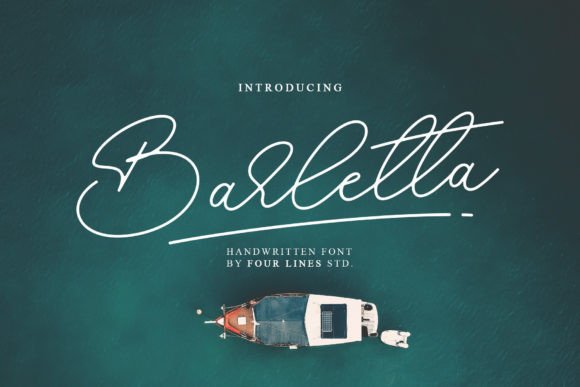
Barletta: A Handwritten Font for Modern Web and Digital Design
Understanding Barletta’s Visual Style and Digital Appeal
Barletta is a clean, handwritten script font designed for readability and visual harmony in digital environments. Unlike overly decorative scripts, Barletta balances personality with practicality, making it ideal for web designers and UI creators who need expressive typography without sacrificing usability. Its smooth curves and open spacing give it a modern, approachable tone that works well across branding, web headers, and marketing assets. Whether used in a hero section or a product landing page, Barletta delivers a human touch that resonates with audiences.
How Barletta Enhances Web Readability and Visual Hierarchy
When designing for the web, readability is crucial—especially on mobile devices. Barletta excels as a display font, particularly for headlines, section headers, and short calls to action. Its PUA encoding ensures access to special glyphs and alternate characters directly from your keyboard, allowing for design flexibility without complicating the workflow. Using Barletta in hero sections or featured content blocks helps establish visual hierarchy, guiding users through a page with clear, elegant typography.
Using Barletta in Brand-Centric Web Experiences
Barletta’s personality makes it a strong candidate for brand-focused web experiences. It works especially well for creative professionals, lifestyle brands, and boutique businesses that want to convey warmth and authenticity. Whether you're designing a personal portfolio, coaching website, or digital product page, Barletta can reinforce your brand tone. It’s also a great choice for logo text, packaging design, and social media graphics—ensuring a consistent visual identity across all digital touchpoints.
Where to Use Barletta in Web and UI Design
- Hero headers and landing page titles
- Call-to-action buttons and banners
- Blog headers and featured content sections
- Online store banners and product descriptions
- Course landing pages and digital brand kits
Because of its legibility at larger sizes, Barletta is best suited for short phrases, titles, and accent text rather than body copy. Pair it with a clean sans serif font like Open Sans or Lato for body text to maintain a balanced, professional layout that supports user scanning and engagement.
Mobile Usability and Responsive Design Tips
When using Barletta on mobile screens, consider adjusting font sizes and spacing to maintain clarity. On smaller devices, avoid using the font for long strings of text or fine print. Instead, use it for high-impact areas like headlines and promotional banners. For dark backgrounds, ensure sufficient contrast by using white or light-colored text. When overlaying Barletta on images, consider using a semi-transparent background or text shadow to maintain readability without losing the font’s visual appeal.
Font Pairing Strategies for Web Design
Barletta shines when paired with minimalist, highly readable fonts. For a modern, clean look, pair it with a sans serif like Montserrat or Raleway for navigation menus, body paragraphs, and form labels. For more editorial or luxury-focused designs, try combining Barletta with a serif font like Playfair Display or Merriweather. This contrast reinforces visual hierarchy and keeps the user experience both engaging and professional.
What to Check Before Using Barletta in Commercial Projects
Before integrating Barletta into a live website or client project, verify the font’s licensing terms. Most premium fonts, including Barletta, offer commercial licenses that cover use in websites, online stores, and digital templates. Ensure that webfont formats (like WOFF and WOFF2) are included for optimal browser compatibility. Also, check if the font supports multiple weights, alternates, and multilingual characters—especially if your site targets international audiences or requires typographic variety.
Final Thoughts on Barletta for Web Designers and Digital Creators
Barletta is more than just a decorative script—it’s a versatile tool for building brand identity and enhancing digital layouts. Whether you're designing a portfolio site, product landing page, or online store, Barletta brings a human, approachable feel that supports engagement and trust. As part of a broader design system, it works well alongside modern sans serif and serif fonts, giving your brand a cohesive, professional look across all digital channels. If you're looking for a handwritten font that’s both expressive and practical, Barletta deserves a place in your design toolkit.